

Computer & Office
Upgrade Your Workspace
Discover premium computer essentials and office supplies designed to boost your productivity and style.
Explore Gear
.webp)
Discover premium computer essentials and office supplies designed to boost your productivity and style.
Explore Gear


Standard delivery charges apply.
Secure handling guaranteed.
Take control with the Wireless Black Metal Shell Four Button Copy Remote Control – a versatile, self-learning device designed to duplicate and replace existing remotes with ease. With a sleek and durable black metal shell, this universal remote combines strength, style, and reliable performance, making it a must-have tool for both home and professional use.
This smart copy remote works on 315/433 MHz frequencies and supports multiple coding chips including 2262, 2260, 1527, 2240, 3526, and more. It allows users to easily transfer and replicate encoding methods from one remote to another, offering complete functionality of the original. Featuring four programmable buttons, it is capable of replacing different remotes in one convenient device.
Engineered for simplicity, the remote supports code clearing, learning, and restoring functions with straightforward button operations. Before use, always clear existing codes for accurate copying. Please note: it can copy fixed codes such as EV1527 and PT2240, but not rolling codes like HCS301. With wide compatibility, compact size, and durable build, this wireless copy remote is the ultimate “master key” solution for radio frequency remote controls.
Wireless copy remote control manual
I. Overview*
The wireless copy remote control is a new type of self-learning remote control, which can transfer another encoding method to the remote
control
It is easily copied to this remote control to have the same functions of the copied remote control. There are many kinds of copy remote
controllers, there are many coding chips that can be copied, and the frequency can also be customized. It is a "master key" in the radio
frequency remote control series.
Second, technical parameters*
Working voltage DC12V
Working current 10MA
Frequency 315/433 MHZ (other frequencies can be customized)
Applicable codes 2262, 2260, 1527, 2240, 3526, 5026, 527, 918, 6010, 6014, etc.
Environment temperature —20℃~+50℃
3. Operation method*
1, *clear code*
Press and hold the lock button and unlock button at the same time. After 2 seconds, the LED indicator flashes three times, and then flashes
continuously. Indicates that the code stored in the remote control has been cleared.
2. *Copy (learn)*
Hold the copied remote control in one hand and the copy remote control in the other hand. Keep the two remote controls as close as possible
and press the buttons of the two remote controls at the same time. After 3 seconds, the LED indicator flashes three times, and then flashes
continuously. This indicates that the key of the copy remote control is the same as the key of the copied remote control. The other keys are
also learned by the above method.
3. *Restore encoding*
If the copied remote control code is erased by mistake, don't worry, the remote control can be restored by itself. The method is to press
the upper and lower buttons at the same time, (the metal shell remote control is on the left, the plastic shell remote control is on the
right) 3 seconds later, the LED indicator flashes three times, and then flashes continuously. This indicates that the original code of the
remote control has been restored.
Four, *Notes*
1. The frequency of the copied remote control and the copied remote control may be different, but the transmitted frequency of the remote
control after successful copying is inherent in itself.
2. The keys of the copy remote control and the copied remote control can be arbitrary, as long as both are operated at the same time, the
functions of the two are the same after success.
3. Before using this copy remote control to copy, please be sure to clear the existing code of this remote control. The following is a
method to test whether the existing codes of the copied remote control are successfully cleared:
After you clear the code, you can press any key on the remote control. If the LED does not flash immediately at this time, it will flash
after 2S, which means that the cWireless copy remote control manual
I. Overview
The wireless copy remote control is a new type of self-learning remote control, which can transfer another encoding method to the remote
control
It is easily copied to this remote control to have the same functions of the copied remote control. There are many kinds of copy remote
controllers, there are many coding chips that can be copied, and the frequency can also be customized. It is a "master key" in the radio
frequency remote control series.
Second, technical parameters
Working voltage DC12V
Working current 10MA
Frequency 315/433 MHZ (other frequencies can be customized)
Applicable codes 2262, 2260, 1527, 2240, 3526, 5026, 527, 918, 6010, 6014, etc.
Environment temperature —20℃~+50℃
Three, operation method
1. Clear code
Press and hold the lock button and unlock button at the same time. After 2 seconds, the LED indicator flashes three times, and then flashes
continuously. Indicates that the code stored in the remote control has been cleared.
2. Copy (learn)
Hold the copied remote control in one hand and the copy remote control in the other hand. Keep the two remote controls as close as possible
and press the buttons of the two remote controls at the same time. After 3 seconds, the LED indicator flashes three times, and then flashes
continuously. This indicates that the key of the copy remote control is the same as the key of the copied remote control. The other keys are
also learned by the above method.
3. Recovery code
If the copied remote control code is erased by mistake, don't worry, the remote control can be restored by itself. The method is to press
the upper and lower buttons at the same time, (the metal shell remote control is on the left, the plastic shell remote control is on the
right) 3 seconds later, the LED indicator flashes three times, and then flashes continuously. This indicates that the original code of the
remote control has been restored.
Four, matters needing attention
1. The frequency of the copied remote control and the copied remote control may be different, but the transmitted frequency of the remote
control after successful copying is inherent in itself.
2. The keys of the copy remote control and the copied remote control can be arbitrary, as long as both are operated at the same time, the
functions of the two are the same after success.
3. Before using this copy remote control to copy, please be sure to clear the existing code of this remote control. The following is a
method to test whether the existing codes of the copied remote control are successfully cleared:
After you clear the code, you can press any key on the remote control. If the LED does not flash immediately at this time, it will flash
after 2S, which means that the copied code has been completely cleared. If the LED still flashes quickly and immediately, That means that
the encoding of copy still exists.
4. Copying the remote control can copy fixed codes, EV1527, PT2240, but cannot copy rolling codes, such as HCS301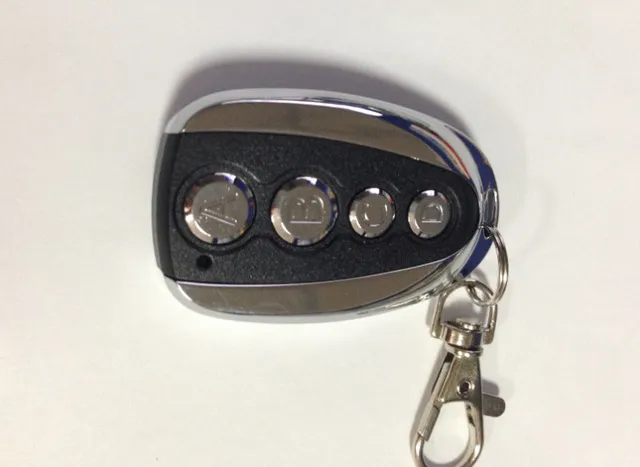
We deliver your orders quickly, safely, and securely. Most orders arrive within 7–21 working days. Local deliveries may arrive sooner.
Delivery times may vary based on location, order volume, and courier schedules. Some rural areas may take longer.
If your order hasn't arrived within the estimated timeframe, please contact us: contact@giftdeal.com.au
No FAQs available for this product yet.
Buyer guide not available for this product.