.webp)
Standard delivery charges apply.
Secure handling guaranteed.
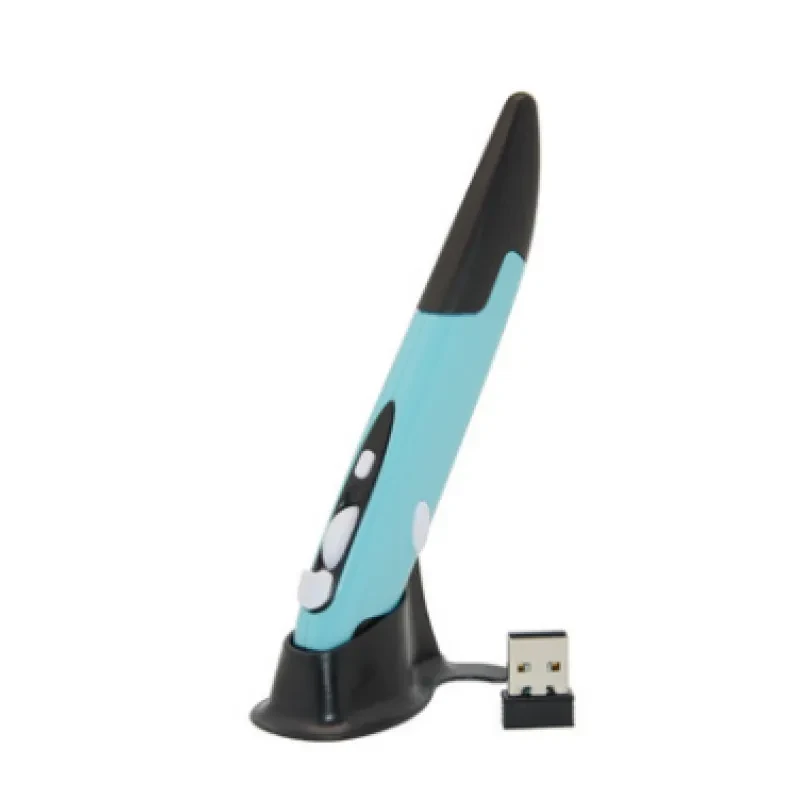
A standard mouse can feel clunky, especially when you’re presenting, sketching ideas, or just trying to work from the couch. The Wireless Optical Pen Mouse changes that experience completely by letting you control your cursor like you’re holding a pen. This Wireless Optical Pen Mouse blends ergonomic design with 2.4GHz wireless connectivity, giving you freedom to move without being stuck to a desk. Adjustable DPI settings, precise optical tracking, and a USB receiver make it a practical pick for everyday computing. And once you’ve used a pen style mouse, going back feels a bit odd, honestly.
Precision matters more than most people realise. With adjustable DPI settings, you can fine tune cursor sensitivity depending on whether you’re editing documents, navigating spreadsheets, or doing detailed graphic work. Lower DPI gives you control for accuracy, while higher DPI helps you zip across multiple monitors without lifting your hand every few seconds. That kind of flexibility makes a real difference during long work sessions.
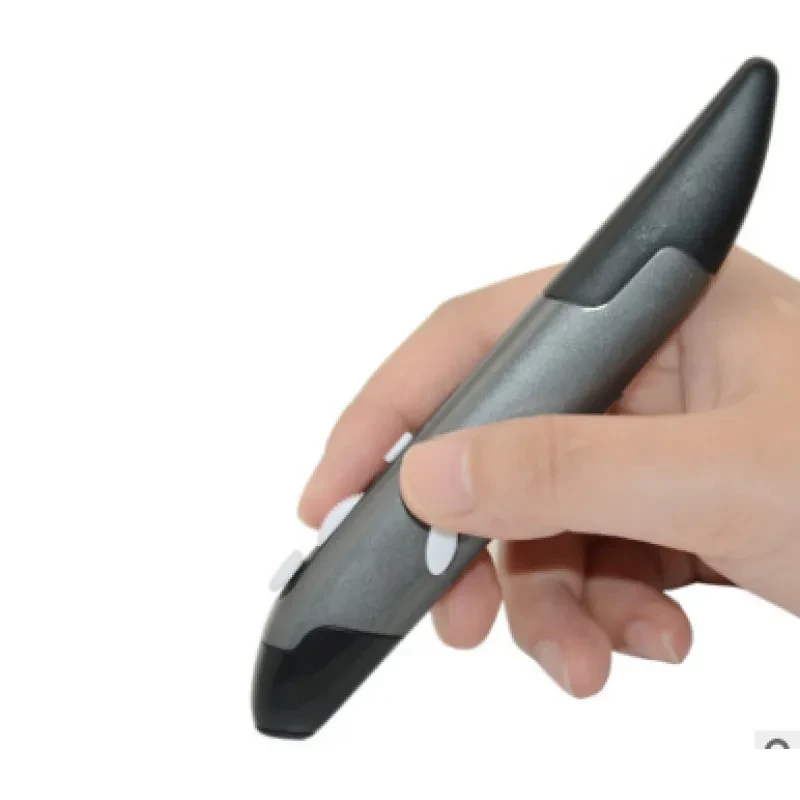
Comfort is another big win here. Traditional mice can strain your wrist, especially if you’re working through deadlines or late night tasks. Holding this pen style device feels natural, similar to writing with a pen, which helps reduce awkward hand angles. Over time, that ergonomic benefit adds up, particularly if you’re dealing with repetitive strain concerns or just want something easier on your joints.
Wireless performance is solid thanks to 2.4GHz technology. You’ll get a stable connection through the USB receiver, with minimal lag or interference. That’s handy during presentations or when you’re switching between devices in a home office setup. And because it’s plug and play, there’s no fiddling with complicated software. You plug it in, and you’re sorted.
The compact form also makes it great for portability. Slip it into a laptop bag, backpack, or even a side pocket, and you’ve got a lightweight input device ready to go. Whether you’re heading into a meeting, working from a café, or travelling between home and office, it doesn’t take up much space at all.
And then there’s versatility. This isn’t just for office work. You can use it for presentations, digital art, remote learning, or even casual browsing from the couch. The pen shape makes it intuitive, especially if you’re already comfortable using styluses or tablets. It just feels natural.
Office workers who spend hours at a desk will appreciate the ergonomic grip and reduced wrist strain. If your day involves spreadsheets, reports, or constant clicking, this pen style mouse offers a more relaxed way to get through tasks without discomfort creeping in.
Students and educators can also get plenty out of it. Picture a uni student working on assignments in the library or a teacher running through slides in a classroom. The wireless functionality and easy portability make it ideal for moving around without being tied to a desk.
Creative users, like designers or digital note takers, will find the pen form especially useful. It feels closer to sketching or writing than a traditional mouse. Even if you’re not a full time creative, it’s a nice change if you like a bit more control over your movements.
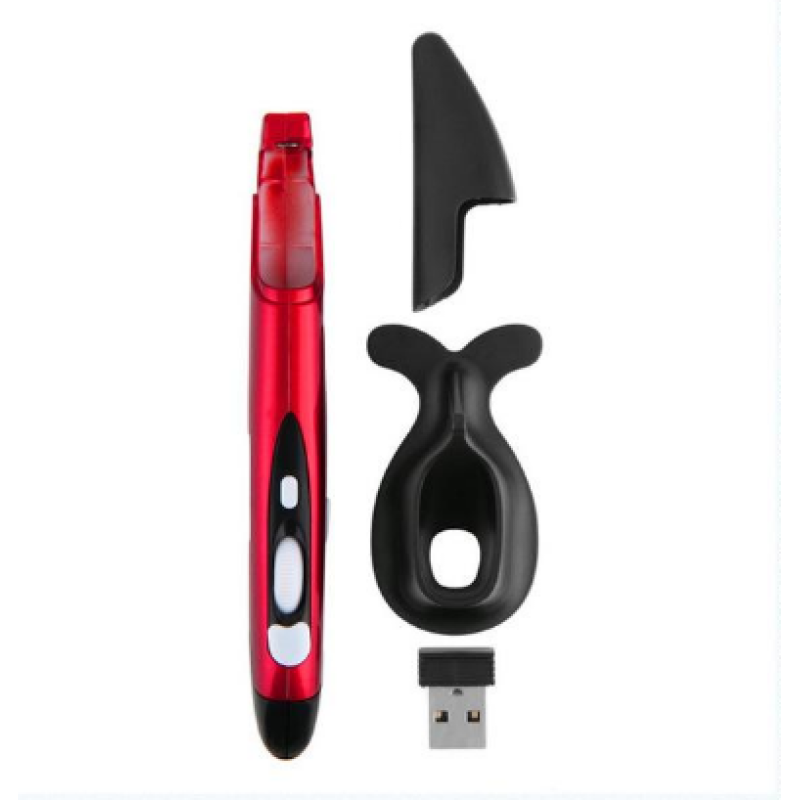
Inside the box you’ll find everything you need to get started straight away.
• Wireless optical pen mouse unit
• USB receiver dongle
• User guide
Specifications:
• Connectivity: 2.4GHz wireless technology
• DPI levels: Adjustable sensitivity settings
• Compatibility: Windows, macOS, most USB enabled devices
• Power: Battery operated
• Tracking system: Optical sensor
• Design: Ergonomic pen style grip
• Range: Up to approximately 10 metres wireless distance
At GiftDeal, we focus on practical tech that fits into real Aussie lifestyles. Since 2020, we’ve been helping customers find useful gadgets that actually improve everyday routines, not just sit in a drawer. This Wireless Optical Pen Mouse is one of those items that makes work and study feel easier. You’ll also get fast domestic shipping across Australia and a hassle free return process if things aren’t quite right. It’s all about making your shopping experience smooth and reliable.
If you’re browsing, you might also want to check out our range of laptop accessories, ergonomic office gear, and wireless keyboards to round out your setup.
Build quality plays a big role in how a pen mouse feels after a few weeks of use. Most models are made from ABS plastic, but not all plastics are equal. Higher grade finishes feel smoother in the hand and resist wear better over time. You’ll also want to look at the button construction and scroll functionality, as these are the parts you’ll use most. A well balanced weight distribution helps prevent fatigue, especially during long sessions at your desk or while working remotely.
DPI settings are one of the first specs people notice, but it’s worth understanding what they actually do. DPI controls cursor sensitivity, and having adjustable levels gives you flexibility across different tasks. Optical sensor accuracy is another important factor, as it determines how smoothly the cursor tracks across surfaces. Wireless range, usually around 10 metres, matters if you plan to use it for presentations or from a distance. Battery type and lifespan also come into play, especially if you want something reliable for daily use without constant replacements.
In the Australian market, pen mice can vary quite a bit in price depending on features and build quality. Cheaper options might work fine for occasional use, but they often lack precision and durability. Spending a bit more usually gets you better sensor performance and more consistent wireless connectivity. From what we’ve seen, it’s worth investing in something that feels comfortable and responds well, especially if you’ll be using it regularly.
The adjustable DPI feature is one of the biggest advantages of this Wireless Optical Pen Mouse. It allows you to switch between different sensitivity levels depending on your activity. If you’re editing fine details in a document or graphic, a lower DPI gives you better control. On the other hand, higher DPI settings are great when you’re navigating across large screens or multiple monitors.
Wireless connectivity using a USB receiver ensures stable performance without noticeable lag. That’s particularly useful in meeting rooms or classrooms where you might be moving around. And because it’s plug and play, there’s no need to install extra drivers, which keeps things simple.
Ergonomics is another standout. The pen style grip mimics natural writing posture, which reduces strain on your wrist and forearm. Over time, that can make a real difference, especially if you spend hours working on a computer. Honestly, the comfort factor alone is enough to make many people switch.
Portability also deserves a mention. This device is compact and lightweight, making it easy to carry between locations. Whether you’re heading to a client meeting or working from a café, it fits neatly into your setup without adding bulk.
Compared to standard mice, pen style devices offer a more natural hand position and improved control for certain tasks. Many generic wireless mice focus on basic functionality, while this Wireless Optical Pen Mouse provides a more specialised experience. It stands out through its ergonomic design and adjustable sensitivity, which are often missing in entry level alternatives. And while trackpads can be convenient, they don’t offer the same precision or comfort for extended use.
Getting started is straightforward. Insert the USB receiver into your computer, then power on the pen mouse. Your system should recognise it automatically within a few seconds. Once connected, you can adjust DPI settings using the designated button, depending on your preference. It’s a good idea to test it on your usual work surface to find the sensitivity that feels right.
Try using the mouse on a consistent surface for better tracking accuracy. While optical sensors work on most desks, smoother finishes tend to provide more reliable movement. Keep the device clean by wiping it with a soft cloth, especially around the sensor area. Battery management also matters, so having a spare on hand can save you mid task. And if you’re using it for presentations, practise switching DPI levels so you can move confidently during slides.
This Wireless Optical Pen Mouse suits a wide range of users across Australia. Office workers dealing with long hours at a desk will appreciate the ergonomic benefits, especially during busy weeks before deadlines. Students juggling lectures and assignments can carry it easily between classes and study sessions. It also fits nicely into home office setups, which have become more common in recent years.
Creative users who prefer a pen like grip for sketching or note taking will find it particularly appealing. It gives a sense of control that traditional mice don’t quite match. And for those running presentations during meetings or training sessions, the wireless range allows freedom to move around without losing control of the cursor.
But here’s the thing, do you really want to keep dealing with wrist discomfort from a standard mouse when there’s a better option sitting right here?
GiftDeal has been serving Australian customers since 2020 with a focus on practical, everyday tech that actually earns its place in your routine. We carefully select products like this Wireless Optical Pen Mouse to make sure they meet real user needs, not just look good on paper. Our range covers work, study, and home setups, so you can build a complete solution in one place. You’ll also get fast shipping across the country and real customer support from a team that understands what Aussie users expect.
[FAQS]
Q: How does a Wireless Optical Pen Mouse differ from a regular mouse?
A: A pen mouse is held like a pen rather than resting your palm on a flat surface. This changes your wrist position and can reduce strain
over time. It also allows more precise movements for certain tasks like drawing or detailed editing. Many users find it more natural after a
short adjustment period.
Q: Is the Wireless Optical Pen Mouse compatible with all computers?
A: Most models work with Windows and macOS systems through a standard USB receiver. As long as your device has a USB port, you should be
able to use it without issues. Some systems may require minor settings adjustments, but generally it’s plug and play. Tablets and
smartphones are not typically supported unless they allow USB input.
Q: What surfaces work best with an optical pen mouse?
A: Optical sensors perform best on flat, non reflective surfaces like a desk or mouse pad. Glass or highly glossy finishes can interfere
with tracking accuracy. Using a consistent surface helps maintain smooth cursor movement. A simple mouse pad often improves performance.
Q: Does this Wireless Optical Pen Mouse require charging or batteries?
A: This type of device is usually powered by standard batteries rather than built in rechargeable units. Battery life depends on usage but
typically lasts several weeks with regular use. Keeping a spare battery handy is always a good idea. Power saving features may also help
extend usage time.
Q: Can I use it for presentations and slideshows?
A: Yes, it works well for presentations thanks to its wireless range. You can move around the room while controlling slides from a distance.
This makes it useful for teachers, trainers, and business meetings. The pen grip also allows more precise pointing during explanations.
Q: Is it suitable for graphic design or digital drawing?
A: While it’s not a full graphics tablet, it does offer better control than a standard mouse. The pen shape feels more natural for sketching
or fine adjustments. For casual design work or note taking, it performs quite well. Professional artists may still prefer dedicated drawing
tablets.
Q: How durable is the pen mouse for daily use?
A: Most models are built with sturdy plastic materials that handle regular use comfortably. Button lifespan and sensor quality are designed
for consistent performance over time. Keeping it clean and storing it properly will help maintain its condition. It’s made to handle
everyday work routines.
Q: What is included in the package when purchasing this device?
A: The package typically includes the pen mouse itself, a USB receiver, and a user manual. Everything you need to get started is in the box.
Setup is quick and doesn’t require extra accessories. You’ll be up and running within minutes.
We deliver your orders quickly, safely, and securely. Most orders arrive within 7–21 working days. Local deliveries may arrive sooner.
Delivery times may vary based on location, order volume, and courier schedules. Some rural areas may take longer.
If your order hasn't arrived within the estimated timeframe, please contact us: contact@giftdeal.com.au
No FAQs available for this product yet.
Buyer guide not available for this product.